
Support centre
Help with HR Manage, from the people who build it
E-mail the support team, look it up in the online help, or call us. Every client also has a dedicated key account manager who knows your configuration.
Get help
Four ways to reach us
For existing HR Manage clients. E-mail is the best way in: the support team turns it into a ticket you can follow in the support centre.
support@peopleres.co.za
The primary channel. Describe the problem in detail and add screen prints, the page address and the steps to reproduce it, with the support package or Support Code described below. The support team logs a ticket for you.
E-mail supportFollow your tickets
support.hrmanage.net
Sign in with your e-mail address (we send you a one-time code, so there is no password to remember) to see the tickets the support team has logged for you. Every ticket has its own link to share with colleagues, and you receive an e-mail as it progresses.
Open the support centreOnline help
help.hrmanage.net
The documentation for every part of HR Manage. It is the generic system documentation: for your organisation’s own policies and procedures, use your custom documentation. In the Windows application, a screen’s Help button opens its page.
Open the online helpPhone
+27 (0) 10 595 2280
Monday to Friday, 08:00 to 17:00 SAST. Ask for the support team or for your key account manager.
Call usBefore you log it
What to include in a ticket
The more we can see, the faster we can find the cause. A good ticket has:
- What you were doing, step by step, so we can reproduce it
- What you expected to happen, and what happened instead
- Screen prints of the screen and of any error message
- The page address (URL), if it happened in the web application
- The Support Code from the web application, or a support package from the Windows application
- Your name and contact details
Not sure whether it is a problem or a question? E-mail it anyway: a question about how to do something is as welcome as a bug report.
Support package Windows application
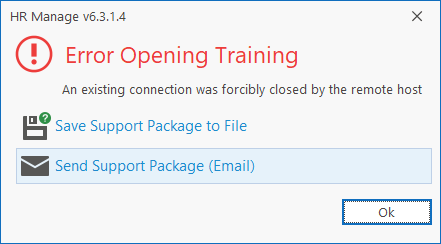
When an error appears, the message offers to save a support package to a file or send it by e-mail. The package holds a screen print and the technical detail of the error. Add the exact steps you took and your contact details.
Need help with a specific record, without an error? Generate a support package from that screen and describe the problem: it takes us straight to the record you are working on.
Support Code Web application
Open the user menu, or the Support Code link at the foot of the page, and copy the page’s code into your ticket. It tells us which page, record and error you saw, and in most cases holds most of what we need to analyse the issue. Add the exact steps to reproduce it.
Good to know
Hours and people
Support hours
Monday to Friday, 08:00 to 17:00 South African time (SAST, GMT+2). E-mails can be sent at any time.
Key account manager
Every client has a dedicated key account manager who knows your configuration and arranges your upgrades.
Release notes
The version history lists the changes in every HR Manage release of the past five years.
For your IT team
Downloads
Prerequisites and free utilities for the servers and computers that run HR Manage. Check the system requirements and the software architecture first.
.NET prerequisites
- Microsoft .NET Framework 4.8
- Required on every server and computer that hosts or runs HR Manage (version 6.0 and newer).Web installer (1.4 MB)Offline installer (116 MB)
- .NET 10 Hosting Bundle
- HR Manage 6.4, 7 and newer: install it on the application server and on the web server. On the download page, under ASP.NET Core Runtime → Windows, choose Hosting Bundle..NET 10 download page
- .NET 9 Hosting Bundle
- HR Manage 6.3 only, on the application server and the web server..NET 9 download page
Microsoft SQL Server
- SQL Server Express
- If your company does not have SQL Server, the free Express edition can be used. It limits each database to 10 GB (50 GB on SQL Server 2025 Express) and uses at most one processor socket. We recommend the latest SQL Server version where possible.SQL Server 2025 web installer (5 MB)SQL Server Management Studio 22 (4 MB)
Established web application
- .NET Core 2.2 Runtime
- For web servers that host the established HR Manage Online application. Needed only until Performance Management has been upgraded to the new web application..NET Core 2.2 Runtime (142 MB)
- Visual C++ 2015 Update 3 RC
- Install it if that web application fails to start.Visual C++ 2015 Update 3 RC (14 MB)
Free utilities
- PeopleRes Data Manager
- Manages and merges data from different sources, for example to retrieve data for HR Manage from external systems.Version 1.8 (12 MB)Version 2.0 (14 MB)
- PeopleRes Server Agent
- Schedules general server tasks such as SQL database backups, file uploads and downloads, and scripts. Runs as a Windows service on the server or as a tray application on a client computer.Installer (10 MB)
Not a client yet?
See HR Manage 7 working on your own processes, or ask us anything.